Crypto Trading Bot That Doesn't Hold Your Keys: What the Permission Screen Actually Does
Giving a bot access to your Binance account feels like handing over your wallet. It doesn't have to — because "access to trade" and "access to withdraw" are two entirely separate permissions, and exchanges enforce that split at their end, not just in the bot's terms of service.
This post explains exactly what a withdrawal-disabled API key can and can't do, how Binance enforces it, and the second question most guides skip: who holds the key itself.
The Two Questions You Should Ask About Any Trading Bot
When someone asks "is it safe to connect a bot to my exchange?", there are really two separate questions in that sentence:
- Can the bot move my funds off the exchange?
- Who has access to my API key?
The first question has a clean technical answer. The second is where cloud and self-hosted bots genuinely differ. Most guides only cover the first one.
How API Permissions Actually Work on Binance
When you create an API key on Binance, you're not granting a single blanket "access" — you're toggling individual capabilities independently:
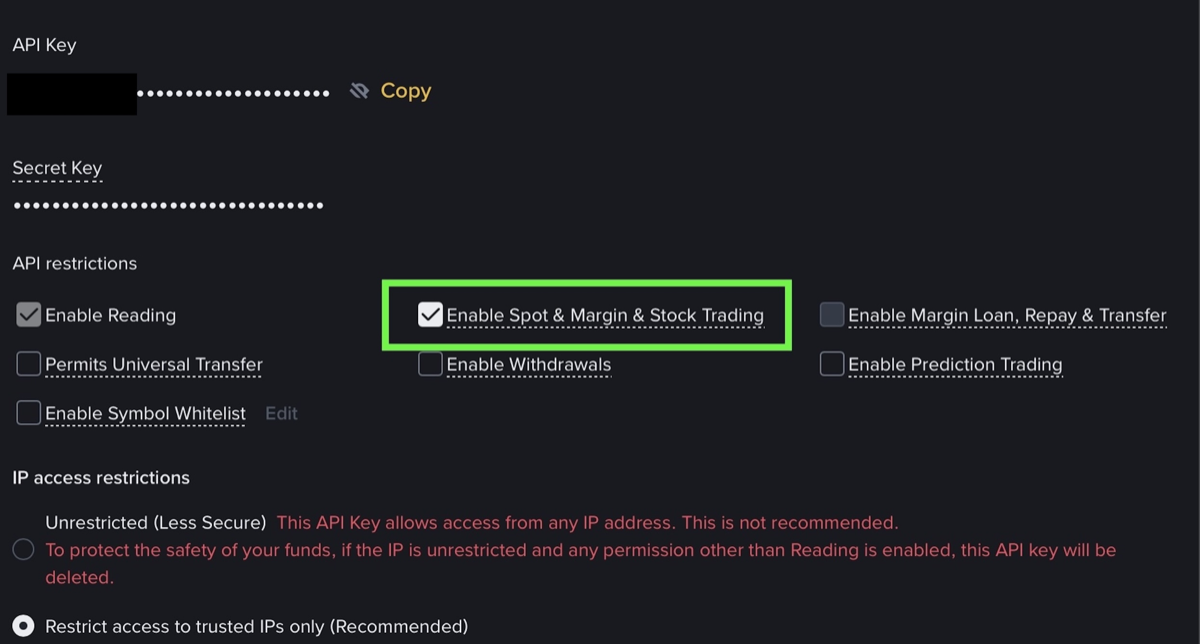
- Enable Reading — lets the key see balances, open orders, and trade history
- Enable Spot & Margin Trading — lets the key place, modify, and cancel orders
- Enable Withdrawals — lets the key transfer funds off the exchange to an external address
A trading bot needs the first two. It never needs the third. More importantly: if you leave "Enable Withdrawals" untoggled — which is the default when creating a new key — the exchange itself blocks any withdrawal request that arrives through that key. The bot doesn't even get to try; Binance refuses at the API layer.
This isn't a bot feature or a vendor promise. It's a restriction enforced by the exchange's infrastructure. Even if a bot developer wanted to code withdrawal logic, it would bounce.
Creating a trade-only key, step by step
- In your Binance account, open API Management and create a new API key. Give it a name you will recognise later — the bot's name works well.
- On the permissions screen, enable Enable Reading and Enable Spot & Margin Trading. Those two are all a trading bot ever needs.
- Leave Enable Withdrawals untouched. It is off by default, and that default is the one that matters: it is enforced on Binance's side, not by the bot.
- Restrict the key to the IP address of the machine your bot runs on. A key that only answers from one address is worth far less to anyone who steals it.
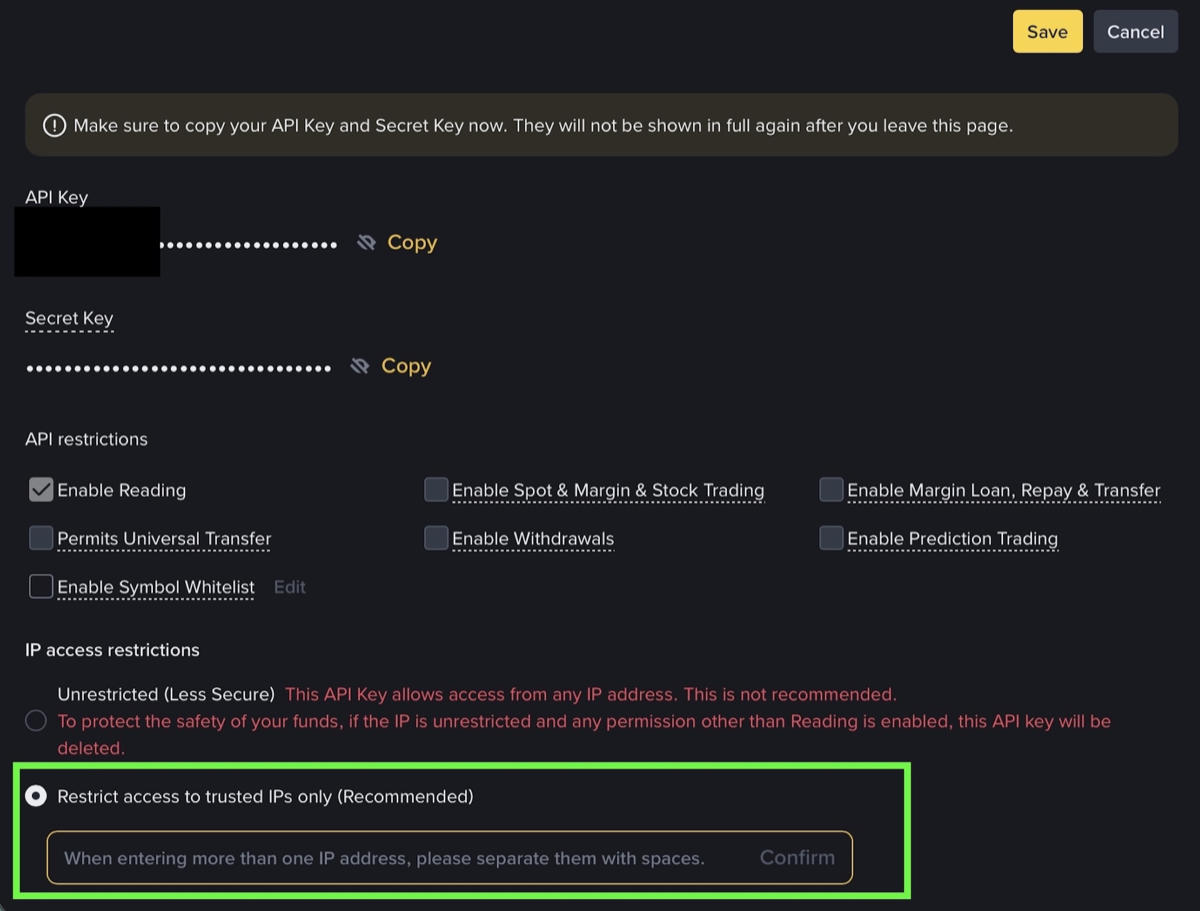
Copy the secret once and store it where your bot reads it. Binance shows it exactly one time.
What a Trade-Only Key Actually Permits
To be concrete: with reading + spot trading enabled and withdrawals disabled, a connected bot can:
- See your USDC, BTC, ETH balances
- Check what orders are currently open
- Place a buy or sell order
- Cancel an order it placed
- Pull historical trade data
It cannot:
- Transfer any coin or token to another wallet
- Withdraw to an external address
- Deposit on your behalf
- Change your account settings
Your funds stay on Binance. They're not "held by the bot" — they're in your exchange account the entire time, and the only withdrawal route is your own login.
The Difference Between "Non-Custodial" and "Self-Hosted"
Here's where most guides stop — and where the interesting part starts.
Both cloud bots and self-hosted bots connect through trade-only API keys. From the perspective of "can the bot drain my exchange account," the custody of funds is the same: no, it can't withdraw. Binance enforces this.
The difference is who holds your API key.
With a cloud trading service, you give them your API key. Their server uses it to send trade instructions. That key is now stored on their infrastructure. If their database is breached, your API key is exposed. A stolen trade-only key can't withdraw your funds directly — but it can:
- Front-run your positions
- Place bad orders deliberately (sell low, buy high)
- Drain your account through strategically bad trades, not through withdrawals
This isn't theoretical. Exchange API key leaks have happened repeatedly, and "no withdrawal access" didn't protect the affected traders from losses made through the trading permission itself.
With a self-hosted bot, your API key never leaves your server. The bot runs on infrastructure you control. There's no third-party database holding the credential. The attack surface is reduced to your own setup.
How NoxTrade Handles This
NoxTrade's trading agent runs on your server — your VPS, your home machine, wherever you install it. Your Binance API key goes into the installer and stays there, in your environment. The agent isn't a cloud service; there's no NoxTrade server receiving your key or sending trades on a shared backend.
The setup requires:
- A Binance API key with Enable Reading and Enable Spot Trading only
- Withdrawals explicitly not enabled — the installer's guide walks through this step-by-step
- Your own server (any machine that can run the agent — a cheap VPS works)
The withdrawal restriction isn't specific to NoxTrade. It's how every responsible bot setup should be configured, on any platform. NoxTrade just runs where the key already lives, instead of asking you to send it somewhere else.
For the full self-hosting setup, the bot comparison guide covers how NoxTrade compares to Freqtrade and other options in practice. For what the agent actually does once it's running, the live results page shows the real track record including losses — no filters.
The One Thing a Withdrawal-Disabled Key Can't Protect Against
Worth saying plainly: none of this protects you from bad trades. A bot with trade-only access can still lose money — by making poor decisions, by acting on false signals, by running in a market environment it wasn't designed for.
"Your keys stay with you" is a security property, not a performance claim. The risk of trading losses is separate from the risk of unauthorized withdrawal, and only the second one is addressed by permission scoping.
If a bot is making decisions you can't explain, that's a different problem. See also: is a crypto trading bot safe? — the security question from a different angle.
Quick Setup Checklist
Before connecting any trading bot to Binance:
- [ ] Create a new API key dedicated to the bot (don't reuse an existing key)
- [ ] Enable: Reading + Spot Trading
- [ ] Leave disabled: Withdrawals, Margin Trading (unless you're using margin intentionally)
- [ ] Set an IP whitelist if the bot runs from a static IP — adds a layer the exchange also enforces
- [ ] Never share the key via screenshots, chat, or support tickets
- [ ] Rotate the key if you suspect it was exposed (generate a new one, delete the old)
The exchange enforces the withdrawal restriction. The IP whitelist is enforced by the exchange too. Everything else is operational hygiene on your end.
Risk warning: Crypto trading involves substantial risk of loss. Past performance of any trading bot, including NoxTrade, does not indicate future results. Do not trade with funds you cannot afford to lose. This is not financial advice.